



Close Menu
The Roaming DevThe Roaming Dev

    Subscribe to Updates

    What's Hot

    Best Cities for Remote Developers (2026 Guide)

    June 3, 2026

    Remote Developer Setup: The Work-From-Anywhere Build

    June 3, 2026

    Remote Developer Jobs: The Complete Work-From-Anywhere Guide

    June 3, 2026
    Facebook X (Twitter) Instagram
    The Roaming DevThe Roaming Dev
    X (Twitter) Instagram Pinterest Reddit
    Subscribe Now
    • Home
    • About Us
    • Where to base
      1. Accomodation
      2. Best Places For Remote Devs
      3. Destination guides
      4. Coworking & wifi
      5. Travel Logistics
      Featured
      Best Places For Remote Devs

      Best Cities for Remote Developers (2026 Guide)

      June 3, 2026
      Recent

      Best Cities for Remote Developers (2026 Guide)

      June 3, 2026

      Best Places to Travel in Winter: Escape the Cold in 2025

      August 1, 2025

      Best Places to Visit in Europe in October for Fall Getaways

      July 4, 2025
    • Mobile Set-Up
      1. Connectivity and Security
      2. Dev tools & editor setup
      3. Laptops & portable hardware
      4. Productivity & collaboration
      5. View All

      What Is Digital Nomadism? The State of Digital Nomadism in 2024

      July 11, 2024

      How to Become a Digital Nomad in 2024 (Pros, Cons, and Common Jobs)

      February 28, 2024

      Best Python Frameworks for Web Development: A 2025 Guide

      September 22, 2025

      Best Open Source VPN: Secure Your Connection for Free

      September 1, 2025

      Best Open Source Software for Developers: Top Picks for 2025

      August 3, 2025

      Best Mechanical Keyboard for Programming: Top Picks for 2025

      May 8, 2025

      Best Speakers For Mac Mini: Enhance Your Audio Experience

      September 2, 2025

      Best Monitor for Mac Mini: Ultimate Buyer’s Guide

      August 5, 2025

      Best Monitor for Developers: Upgrade Your Coding Setup

      August 2, 2025

      Best Linux Distro for Developers: Find the Perfect Fit

      June 5, 2025

      7 Reasons Why is Laravel the best PHP framework in 2024?

      March 30, 2023

      How To Become a PHP Developer in 2024 [Step By Step Beginner’s Guide]

      January 25, 2023

      Is PHP Dead? The State Of PHP in 2024.

      January 24, 2023

      Remote Developer Setup: The Work-From-Anywhere Build

      June 3, 2026

      Best Python Frameworks for Web Development: A 2025 Guide

      September 22, 2025

      Best Video Players for Mac: Smooth & High-Quality Playback

      September 19, 2025

      Best Speakers For Mac Mini: Enhance Your Audio Experience

      September 2, 2025
    • Nomad Logistics
      • Banking & payments
      • Insurance & health
      • Taxes for remote workers
      • Visas & residency
    • Dev Careers
      1. Remote dev jobs & roles
      2. Freelancing & contracting
      3. View All

      Jobs for Americans in Europe: Ultimate Guide (2025)

      January 5, 2025

      17 Best Work-From-Home Jobs Requiring No Experience

      January 4, 2025

      LiveOps Reviews 2024: 11 Things To Know Before Signing Up

      November 3, 2024

      TranscribeMe Reviews 2024: 11 Things To Know Before Signing Up

      November 1, 2024

      Best AI for Coding: Free & Paid Options for Developers

      August 7, 2025

      Best Open Source LLM in 2025: The Ultimate Guide for Developers

      August 4, 2025

      Remote Developer Jobs: The Complete Work-From-Anywhere Guide

      June 3, 2026

      Best AI for Coding: Free & Paid Options for Developers

      August 7, 2025

      Best Open Source LLM in 2025: The Ultimate Guide for Developers

      August 4, 2025

      Jobs for Americans in Europe: Ultimate Guide (2025)

      January 5, 2025
    • Contact
    The Roaming DevThe Roaming Dev
    Where Is PHP INI? 3 Different Methods For Linux, Mac & Windows
    Dev Careers

    Where Is PHP INI? 3 Different Methods For Linux, Mac & Windows

    How to find your PHP.INI Configuration File across Windows, Mac & Linux machines.
    The Roaming DevBy The Roaming DevJanuary 15, 2021Updated:May 13, 2024No Comments3 Mins Read
    Facebook Twitter Pinterest LinkedIn Tumblr WhatsApp Telegram Email
    php logo
    Share
    Facebook Twitter LinkedIn Pinterest Email

    Table of Contents

    Toggle
    • I. Introduction
    • II. What is PHP INI?
    • III. Where is PHP ini in Windows 10?
      • Method 1: PHP Info File
      • Method 2: Find Command
    • IV. Where is PHP ini in Mac?
      • Method 1: PHP Info File
      • Method 2: GREP Command
    • V. Where is PHP ini In Linux/Debian?
      • Method 1: PHP Info File
      • Method 2: GREP Command
      • Method 3: locate command
    • VI. Where is my php.ini file in XAMPP Localhost?
    • VII. How do I Display or Edit PHP ini?
    • VIII. Conclusion

    I. Introduction

    All PHP developers have had to ask where is php.ini at least once in their life. I would argue even more than once.

    This article answers all your questions regarding php.ini files including what it is, how to locate it in different operating systems as well as opening and editing php.ini files.

    II. What is PHP INI?

    PHP INI (short for “PHP Configuration“) is a configuration file used to customize various settings for a PHP installation.

    Additionally, this file contains settings for controlling various aspects of PHP’s behavior, such as error reporting, memory limits, and extensions.

    It allows users to configure PHP in a way that best suits their needs, and can be used to fine-tune performance, security, and functionality. The file is typically named “php.ini” and is located in a specific directory, depending on the operating system and PHP installation method.

    III. Where is PHP ini in Windows 10?

    There are 2 methods to locate your php configuration file in Windows 10 and other Windows operating system versions.

    Method 1: PHP Info File

    1. Create a new PHP file in your document root and paste the below code
    
    <?php
    phpinfo();
    ?>
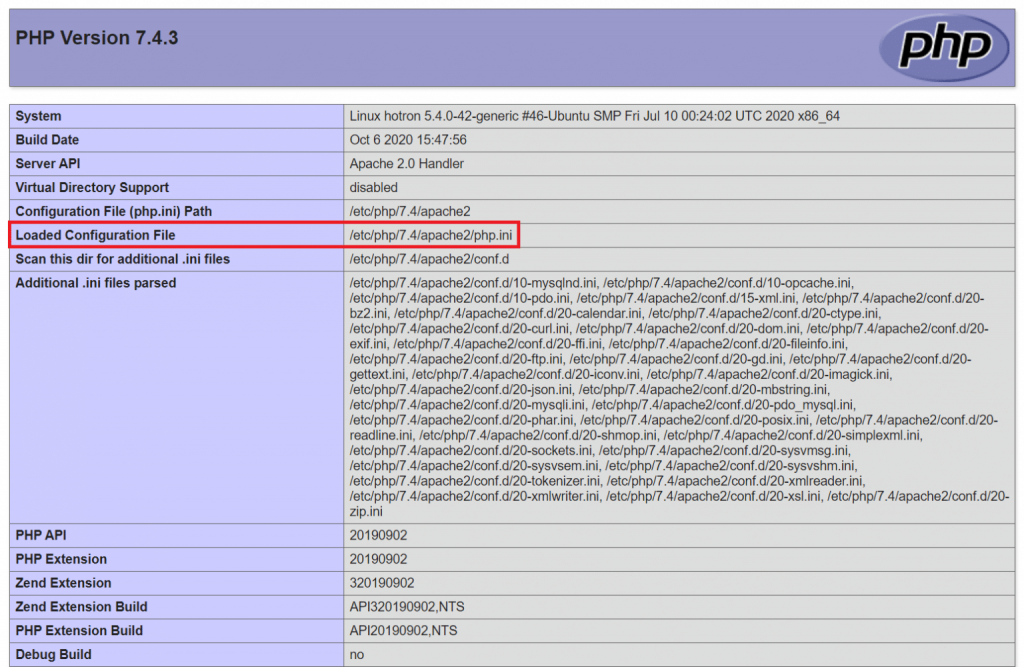
    1. Open the script on a browser to load all PHP configurations.
    2. Press “CTRL” + F and type “Loaded Configuration File“
    3. On the search results, you should see the load php.ini file
    php-ini

    Method 2: Find Command

    To use the find command:

    1. Open Command Prompt
    2. Copy and paste the command below
    php -i|find/i"configuration file"

    You should see output similar to

    Loaded Configuration File =&gt; /etc/php/7.4/cli/php.ini

    IV. Where is PHP ini in Mac?

    Method 1: PHP Info File

    1. Create a new PHP file in your document root and paste the below code
    
    <?php
    phpinfo();
    ?>
    1. Open the script on a browser to load all PHP configurations.
    2. Press “CTRL” + F and type “Loaded Configuration File“
    3. On the loaded results, you should see the .ini file
    php-ini

    Method 2: GREP Command

    To use the grep command:

    1. Open your terminal
    2. Copy and paste the command below
    php -i | grep ini

    Your output should look something like

    Loaded Configuration File =&gt; /etc/php/7.4/cli/php.ini

    V. Where is PHP ini In Linux/Debian?

    Method 1: PHP Info File

    1. Create a new PHP file in your document root and paste the below code
    
    <?php
    phpinfo();
    ?>
    1. Open the script on a browser to load all PHP configurations.
    2. Press “CTRL” + F and type “Loaded Configuration File“
    3. On the loaded results, you should see the load .ini file
    php-ini

    Method 2: GREP Command

    To use the grep command:

    1. Open your terminal
    2. Copy and paste the command below
    php -i | grep ini

    Your output should look something like

    Loaded Configuration File =&gt; /etc/php/7.4/cli/php.ini

    Method 3: locate command

    Another command that can be used on Linux and Debian distributions is locate.

    To find your php configuration file:

      1. Open your terminal
      2. Copy and paste the command below
      locate php.ini

      This will output a list of all php.ini files in your machine.

    VI. Where is my php.ini file in XAMPP Localhost?

    If you are using XAMPP on Mac:

    "Applications/XAMPP/etc/php.ini"

    If are using XAMPP on Windows:

    "C:\xampp\php\php.ini"

    Linux/Debian:

    "/opt/lampp/etc/php.ini"

    VII. How do I Display or Edit PHP ini?

    On Windows:

    1. Locate your php.ini file using the methods outlined in this post.
    2. Open it using your preferred text editor

    For Mac users

    nano {path-to-php-ini}

    Linux & Debian Users

    sudo vim {path-to-php-ini}

    VIII. Conclusion

    I hope this post answers all your questions about locating your php.ini configuration file. Happy coding!

    Also Read: How To Become a PHP Developer in 2024 [Step By Step Guide]

    Share. Facebook Twitter Pinterest LinkedIn Tumblr Email
    The Roaming Dev
    • Website

    Related Posts

    Remote Developer Jobs: The Complete Work-From-Anywhere Guide

    June 3, 2026

    Best AI for Coding: Free & Paid Options for Developers

    August 7, 2025

    Best Open Source LLM in 2025: The Ultimate Guide for Developers

    August 4, 2025

    Jobs for Americans in Europe: Ultimate Guide (2025)

    January 5, 2025

    17 Best Work-From-Home Jobs Requiring No Experience

    January 4, 2025

    LiveOps Reviews 2024: 11 Things To Know Before Signing Up

    November 3, 2024
    Add A Comment

    Comments are closed.

    Subscribe to My Newsletter

    Don't Miss
    Best Places For Remote Devs

    Best Cities for Remote Developers (2026 Guide)

    June 3, 2026

    Forget the beach photos for a second. The best city for a remote developer is…

    Remote Developer Setup: The Work-From-Anywhere Build

    June 3, 2026

    Remote Developer Jobs: The Complete Work-From-Anywhere Guide

    June 3, 2026

    Best Python Frameworks for Web Development: A 2025 Guide

    September 22, 2025
    Our Picks

    Top 10 Best Mac Time Tracking Apps For 2024 [Including Free Options]

    January 30, 2023

    10 Best Remote Collaboration Software For 2024[Pros, Cons & Pricing]

    January 29, 2023

    10 Best Mac Apps For Developers In 2024

    January 28, 2023

    How To Become a PHP Developer in 2024 [Step By Step Beginner’s Guide]

    January 25, 2023
    Stay In Touch
    • Twitter
    • Pinterest
    • Instagram
    • Reddit
    About The Roaming Dev
    About The Roaming Dev

    Discover the digital nomad lifestyle, remote work insights, travel adventures, developer guides, and top software recommendations on our lifestyle blog. Your hub for a tech-savvy, nomadic journey.

    Email us: theroamingdev@gmail.com

    Follow me on social media for more content!

    X (Twitter) Instagram Pinterest Reddit
    Our Picks

    Top 10 Best Mac Time Tracking Apps For 2024 [Including Free Options]

    January 30, 2023

    10 Best Remote Collaboration Software For 2024[Pros, Cons & Pricing]

    January 29, 2023

    10 Best Mac Apps For Developers In 2024

    January 28, 2023
    Legal & Compliance
    • Terms Of Use
    • Disclaimer
    • Privacy Policy
    Facebook X (Twitter) Instagram Pinterest
    • Home
    • Dev Careers
    • Where to base
    • Mobile Set-Up
    • Nomad Logistics
    © 2026 The Roaming Dev

    Type above and press Enter to search. Press Esc to cancel.

    ~/the-nomads-choice/subscribe.sh
    Wifi Â· Found

    # for devs who push to prod from a hammock

    $ join –roaming-devs

    One email. Zero fluff. The tools, gigs, visas, and dirt-cheap fast-wifi spots that keep roaming devs shipping from anywhere on Earth.

    ✓remote gigs & contracts worth your time
    ✓nomad-proof tools, setups & dev stacks
    ✓visa & tax hacks, decoded for builders
    ✓fast-wifi cafés the tourists never find
    broadcasting live from a beach in Bali

    no spam, ever. unsubscribe in 1 click. — The Nomad’s Choice

    Ad Blocker Enabled!
    Ad Blocker Enabled!
    Our website is made possible by displaying online advertisements to our visitors. Please support us by disabling your Ad Blocker.