









The best keyboard for programming for most developers is the Keychron Q1 Max, at about $230. Specifically, it pairs a compact 75% layout with QMK/VIA remapping and tri-mode wireless.
As a result, you keep the arrow keys and function row that IDE shortcuts need. Meanwhile, the board takes far less desk space than a full-size keyboard.
On a tight budget, the Royal Kludge RK61 costs about $40 and has over 6,500 Amazon ratings. If you want a numpad, the Keychron V6 Max gives you a full-size QMK board for about $120.
Meanwhile, Mac users should look at the Logitech MX Mechanical Mini for Mac, which also types quietly on calls. Finally, developers with wrist pain should go split, starting with the Kinesis Freestyle Edge at about $219.
Below, we compare nine keyboards on layout, switches, remapping, noise and travel weight. For the rest of your kit, see our remote developer gear guide.
Quick Answer: Best Keyboards for Programming in 2026
Best overall: Keychron Q1 Max (~$230), a 75% aluminum board with QMK/VIA and tri-mode wireless.
Best value full-size: the Keychron V6 Max (~$120), a QMK board with a numpad.
Best budget: Royal Kludge RK61 (~$40), a hot-swap 60% board.
Best for Mac and calls: Logitech MX Mechanical Mini for Mac (~$155), quiet tactile switches.
Best low-profile: Lofree Flow Lite 84 (~$100), a slim 75% with linear switches.
Best for travel: Keychron K3 Max SE (~$105), an ultra-slim 75% under an inch tall.
Best for vim and the terminal: HHKB Professional Hybrid Type-S (~$300), silent Topre switches.
Best split under $250: Kinesis Freestyle Edge RGB Plus (~$219), a hot-swap split board.
Best for wrist pain: the Kinesis Advantage360 Professional (~$479), a contoured split board.
How We Chose These Programming Keyboards
A programming keyboard spends its life on brackets, modifiers and arrow keys, not on games. Therefore, every pick had to keep those keys reachable without awkward chords.
First, layout mattered most, because it decides where Home, End and the function row live. For that reason, we favored 75% and full-size boards, then added 60% options only where remapping fixes the gaps.
Second, we looked at remapping. In particular, boards with QMK or VIA scored higher, since your custom layer travels with the keyboard to any laptop.
We also weighed noise for video calls, multi-device pairing and weight in a laptop bag. Our team codes daily on a 75% wireless board.
In short, complaints about Bluetooth drops, dead keys or flimsy parts pushed boards down the list.
Every price and rating was checked on Amazon US on 12 November 2026. Also, no brand paid for a place here.
Programming Keyboards Compared
| Keyboard | Best for | Price | Layout | Remapping | Connection |
|---|---|---|---|---|---|
| Keychron Q1 Max | Best overall | ~$230 | 75% | QMK/VIA | 2.4 GHz, Bluetooth, wired |
| Keychron V6 Max | Full-size value | ~$120 | 100% | QMK, web app | 2.4 GHz, Bluetooth, wired |
| Royal Kludge RK61 | Budget | ~$40 | 60% | QMK/VIA | Wired |
| Logitech MX Mechanical Mini for Mac | Mac and calls | ~$155 | 75% | Logi Options+ | Bluetooth |
| Lofree Flow Lite 84 | Low-profile | ~$100 | 75% | Limited | 2.4 GHz, Bluetooth, wired |
| Keychron K3 Max SE | Travel | ~$105 | 75% | QMK, web app | 2.4 GHz, Bluetooth, wired |
| HHKB Professional Hybrid Type-S | Vim and terminal | ~$300 | 60% | On-board keymap | Bluetooth, wired |
| Kinesis Freestyle Edge RGB Plus | Split under $250 | ~$219 | Split | On-board | Wired |
| Kinesis Advantage360 Professional | Wrist pain | ~$479 | Contoured split | ZMK | Bluetooth, wired |
The 9 Best Keyboards for Programming in 2026
1. Keychron Q1 Max: Best Keyboard for Programming Overall

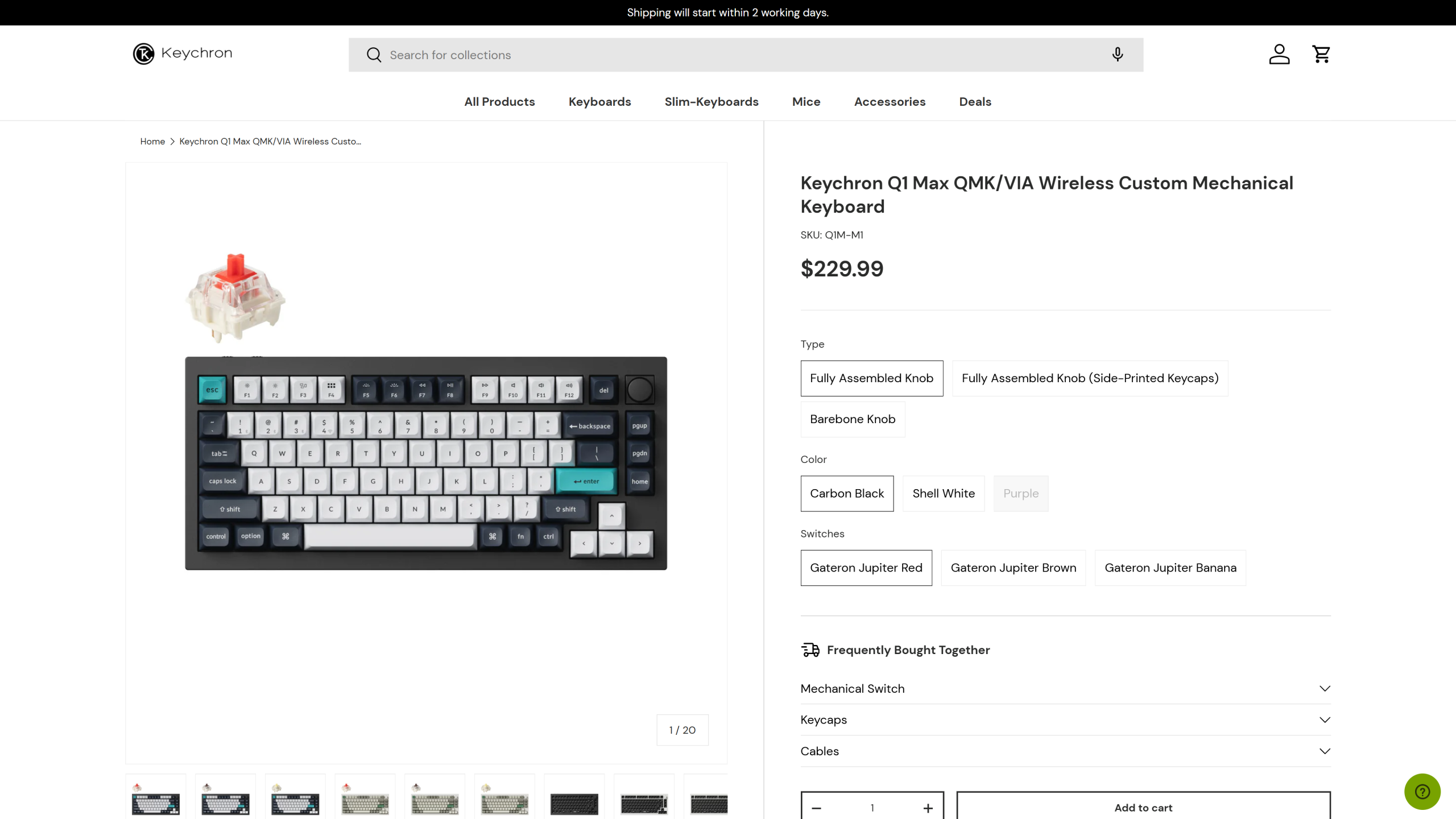
Price: ~$230 | Layout: 75% with knob | Switches: Gateron Jupiter Brown (tactile), hot-swap | Remapping: QMK/VIA | Battery: up to 180 hours (listed) | Best for: Developers who want one keyboard for years
The Keychron Q1 Max is the keyboard we would hand most developers first. Above all, its 75% layout keeps the function row and arrows.
So F5 and F10 debugging shortcuts stay one press away.
Under the hood, it runs open-source QMK firmware with VIA support. As a result, you can turn Caps Lock into Escape on tap and Control on hold, which vim users love.
Better still, the remap saves on the keyboard itself. Therefore, your layout works on a locked-down work laptop without installing any software.
Similarly, connection options cover every desk. You get a 1,000 Hz 2.4 GHz dongle, a USB-C cable, or Bluetooth 5.1 with three paired devices.
Fit and sizing: this is a heavy, full-aluminum board, listed at 5.15 pounds. As a result, it suits a home desk, but it is too heavy for a travel bag.
Also, check the layout before you order. Amazon sells several variants, including AZERTY and Workman, so choose the US QWERTY listing.
What’s included: the keyboard, a USB-C cable, the 2.4 GHz receiver and a keycap and switch puller. Keychron covers it with a 1-year warranty.
What owners say: owners rate the US layout 4.2 from 42 reviews. They praise the build quality and say it works smoothly with both Mac and Windows.
However, value for money gets mixed comments. After all, at about $230, some owners expected more for the price.
How it compares: the Keychron V6 Max costs about $110 less and adds a numpad. By contrast, the Q1 Max has a premium aluminum case and a smaller footprint.
Who it suits: it suits developers who want a desk keyboard they can tune for years.
Who should skip it: on the other hand, travelers should skip it, because the aluminum case is heavy.
Pros:
- QMK/VIA remapping saved on the board
- Function row and arrows for IDE shortcuts
- Tri-mode wireless with three devices
- Hot-swap switches you can change later
Cons:
- Heavy at 5.15 pounds (listed)
- Several layout variants on Amazon
Skip if: you need a numpad for data work. Instead, the Keychron V6 Max keeps one.
2. Keychron V6 Max: Best Full-Size Keyboard for Programming
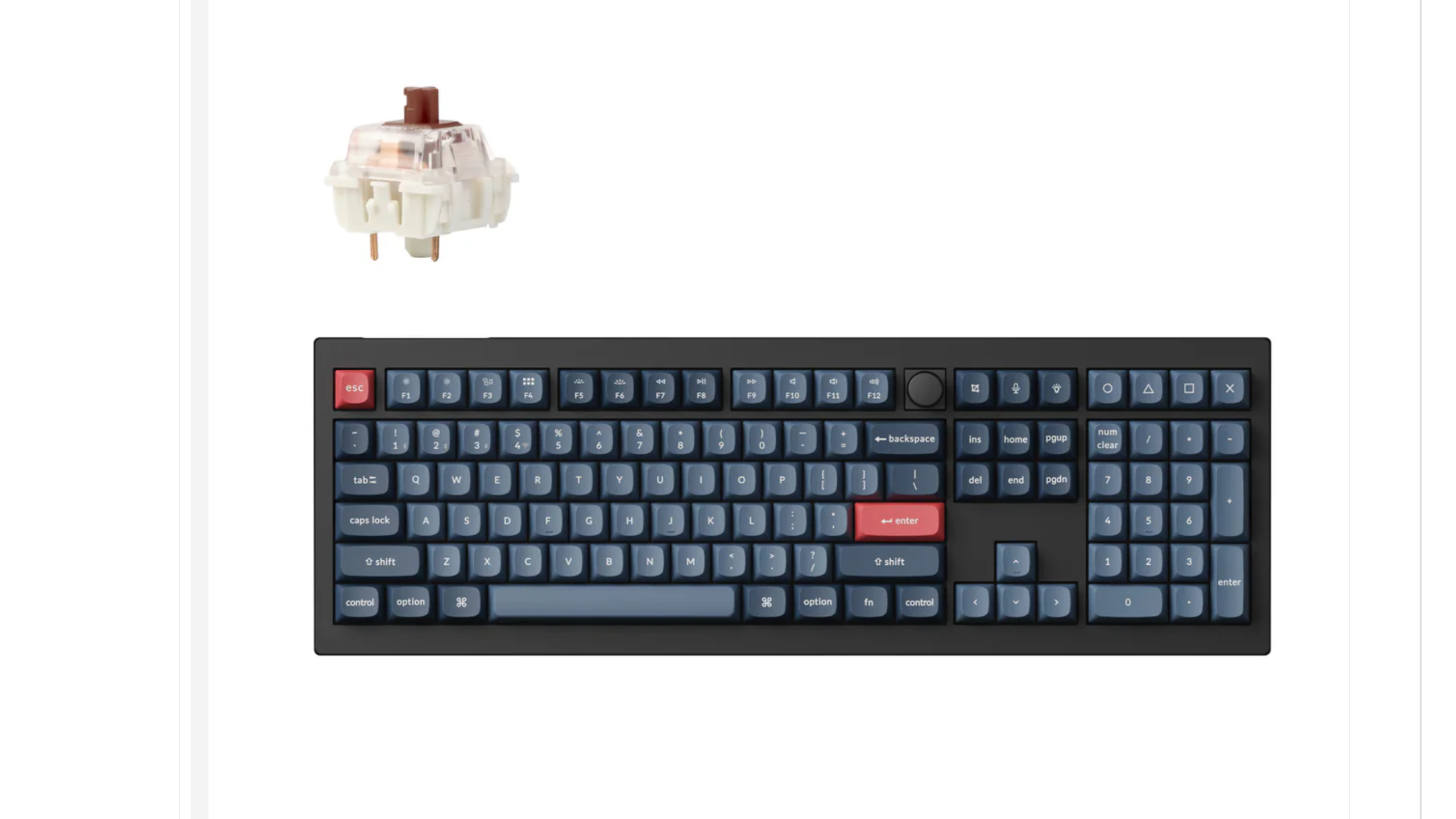
Price: ~$120 | Layout: Full-size, 108 keys | Switches: Gateron Brown (tactile), hot-swap | Remapping: QMK, Keychron Launcher web app | Connection: 2.4 GHz, Bluetooth 5.1, wired | Best for: Developers who use a numpad
The Keychron V6 Max is the best full-size keyboard for programming at its price. In other words, you keep the numpad for data entry, plus QMK remapping for your own shortcuts.
Better yet, remapping is simple. You plug in the cable, open the Keychron Launcher web app and drag keys or macros into place.
As a result, it is easy to build a Zoom mute key or a one-press Git shortcut. Also, the hot-swap sockets accept most 3-pin and 5-pin MX switches.
Fit and sizing: the 100% layout is wide, so plan for a large desk. However, it pairs with up to three devices, which helps when you juggle a work laptop and a personal one.
What’s included: the keyboard, a cable and the 2.4 GHz receiver. Keychron covers it with a 1-year warranty.
What owners say: owners rate it 4.3 from 203 reviews. They praise the build, the typing feel and the brown switches, which are satisfying without being loud.
However, a minority call it buggy for the price. Bluetooth also gets mixed reports, so the 2.4 GHz dongle is the safer daily connection.
How it compares: the Keychron Q1 Max costs about $110 more for an aluminum case. By contrast, the V6 Max gives you more keys for far less money.
Who it suits: it is ideal for developers who also handle numbers, spreadsheets or data entry.
Who should skip it: on the other hand, anyone with a small desk should choose a 75% board.
Pros:
- Full-size layout with numpad
- QMK remapping through a web app
- Hot-swap switches
- Strong value at about $120
Cons:
- Takes a lot of desk space
- Mixed Bluetooth reports
Skip if: you mostly code on the move. Then, the Keychron K3 Max SE is far easier to carry.
3. Royal Kludge RK61: Best Budget Keyboard for Programming
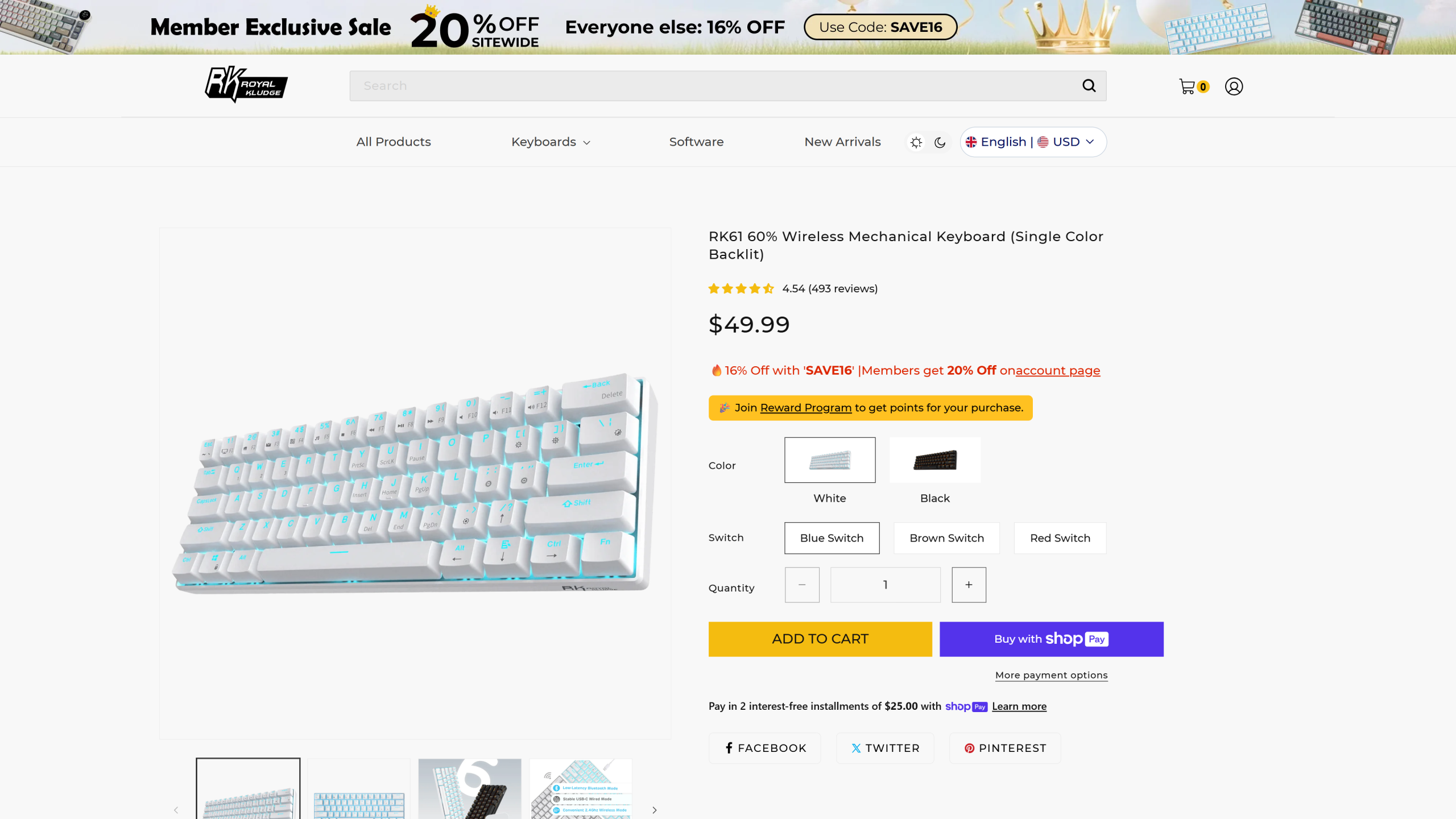
Price: ~$40 | Layout: 60%, 61 keys | Switches: Linear red, hot-swap 3-pin and 5-pin | Remapping: QMK/VIA (listed) | Connection: Wired USB-C | Best for: Students and first mechanical keyboards
The Royal Kludge RK61 is the best budget keyboard for programming, at about $40. In fact, it is one of the most reviewed mechanical keyboards on Amazon.
Moreover, the wired version lists QMK/VIA support, which is rare at this price. Therefore, you can map the missing arrow keys onto a layer you reach with one thumb.
This matters, because a 60% board drops the arrows, function row and Home and End keys. With a good layer, however, your hands never leave the home row.
Fit and sizing: the 61-key board is tiny, so it leaves room for your mouse. Plus, it slips into a backpack sleeve, although it needs a cable.
What’s included: the keyboard, a USB-C cable and a keycap puller. Check the seller page for warranty terms before you buy.
What owners say: owners rate it 4.6 from 6,535 reviews. In particular, they praise the value, the sound and the hot-swap sockets.
On the other hand, reliability gets mixed reviews, with some owners reporting keys that stop working. Because the sockets are hot-swap, though, a dead switch is a cheap fix.
How it compares: the Keychron V6 Max costs about $80 more and adds wireless and a full layout. By contrast, the RK61 is the cheapest way to try mechanical switches and remapping.
Who it suits: it is ideal for students, bootcamp learners and anyone testing the 60% layout.
Who should skip it: on the other hand, developers who rely on the function row should choose a 75% board.
Pros:
- About $40
- QMK/VIA support (listed)
- Hot-swap sockets
- Over 6,500 owner ratings
Cons:
- No arrows or function row without layers
- Some reports of dead keys
Skip if: you hate learning layers. In that case, the Lofree Flow Lite 84 keeps dedicated arrows.
4. Logitech MX Mechanical Mini for Mac: Best Keyboard for Mac and Calls

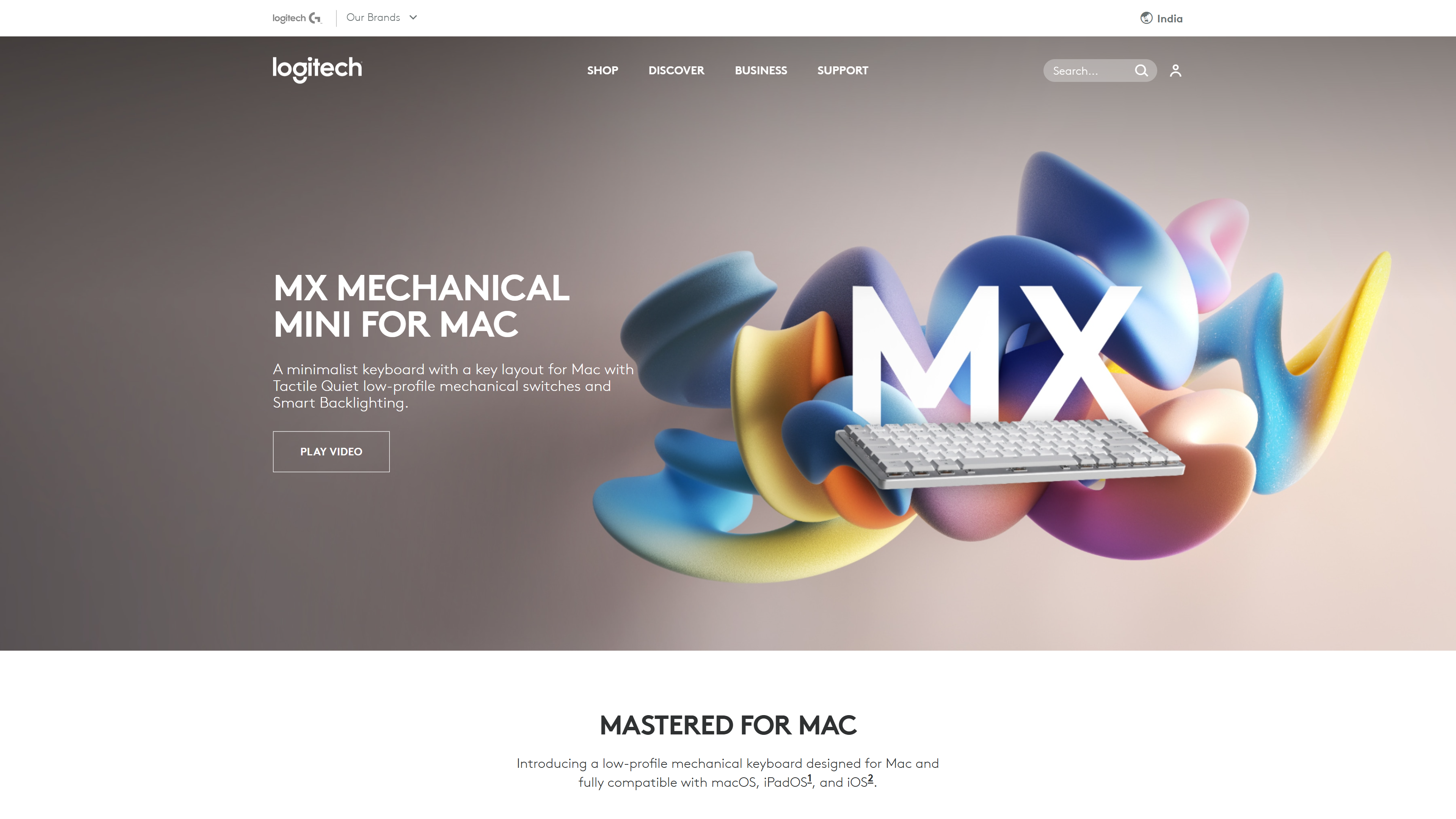
Price: ~$155 | Layout: 75%, Mac legends | Switches: Tactile Quiet, low-profile | Remapping: Logi Options+ app | Connection: Bluetooth Low Energy, 3 devices | Best for: Mac developers on frequent calls
The Logitech MX Mechanical Mini for Mac is the best keyboard for programming on a Mac. For example, it ships with Mac legends, so Command and Option sit exactly where your hands expect.
Better still, its Tactile Quiet switches give a bump you feel but barely hear. As a result, teammates will not hear every keystroke on a video call.
Also, the backlight switches on as your hands approach. Additionally, it pairs with three Macs or iPads and swaps between them with one key.
Fit and sizing: the low-profile keys sit close to the desk, so many people type without a wrist rest. It is listed at 2 pounds, which is light enough to carry occasionally.
What’s included: the keyboard and a USB-C charging cable. Logitech covers it with a 1-year limited warranty.
What owners say: owners rate it 4.2 from 540 reviews. In particular, they praise the build, the comfortable typing and the programmable hotkeys in Logi Options+.
However, some owners report regular Bluetooth drops. Noise also gets mixed comments, so it is quiet for a mechanical board, not silent.
How it compares: the Lofree Flow Lite 84 costs about $55 less and adds a 2.4 GHz dongle. By contrast, the Logitech board has Mac-first legends and quieter switches.
Who it suits: it suits Mac developers who spend their days on Slack huddles and Zoom.
Who should skip it: on the other hand, anyone who wants QMK should skip it, since remapping runs through Logitech’s app.
Pros:
- Mac layout and legends
- Quiet tactile switches for calls
- Smart backlight
- Three-device switching
Cons:
- Bluetooth only, with some reported drops
- Remapping needs Logitech’s app
Skip if: you work on Linux. Instead, the Keychron Q1 Max supports Linux out of the box.
5. Lofree Flow Lite 84: Best Low-Profile Keyboard for Programming

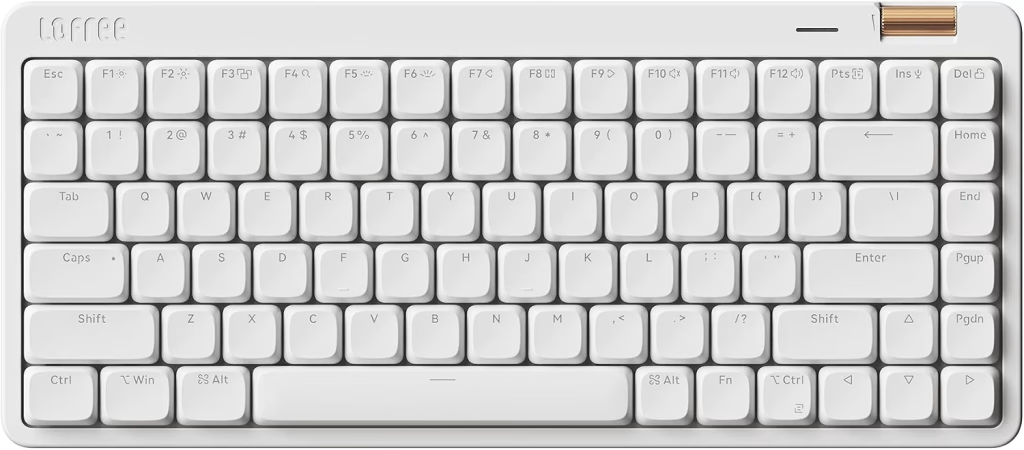
Price: ~$100 | Layout: 75%, 84 keys | Switches: Kailh Specter POM linear, low-profile, swappable | Remapping: Limited | Connection: 2.4 GHz, Bluetooth, wired | Best for: Developers who like laptop-style keys
The Lofree Flow Lite 84 is the best low-profile keyboard for programming. In fact, it feels close to a laptop keyboard, but with smooth mechanical linear switches.
Above all, its low front height keeps your wrists flatter. Also, a gasket design cushions each keystroke, so long sessions feel softer.
Similarly, owners describe the sound as creamy and soft rather than loud. Therefore, it works in a shared flat or a quiet coworking space.
Fit and sizing: the 75% layout keeps dedicated arrows and a function row. It is listed at 1.8 pounds, so it travels well.
What’s included: the keyboard, a USB-C cable and the 2.4 GHz receiver. Check the seller page for warranty terms before you buy.
What owners say: owners rate it 4.2 from 972 reviews. In particular, they praise the smooth typing, the sleek design and the soft sound.
On the other hand, connectivity gets mixed reviews, and Bluetooth draws the most complaints. Some owners also find the backlight dim.
How it compares: the Keychron K3 Max SE costs about $5 more and adds QMK remapping. By contrast, the Lofree has a softer, more cushioned feel.
Who it suits: it is ideal for developers moving from a laptop keyboard to mechanical switches.
Who should skip it: on the other hand, power users who want deep remapping should choose a QMK board.
Pros:
- Laptop-like low profile
- Smooth, quiet linear switches
- Tri-mode connection
- Light at 1.8 pounds (listed)
Cons:
- Limited remapping
- Bluetooth complaints
Skip if: you want macros on every key. Then, the Keychron K3 Max SE runs QMK.
6. Keychron K3 Max SE: Best Keyboard for Programming on the Go

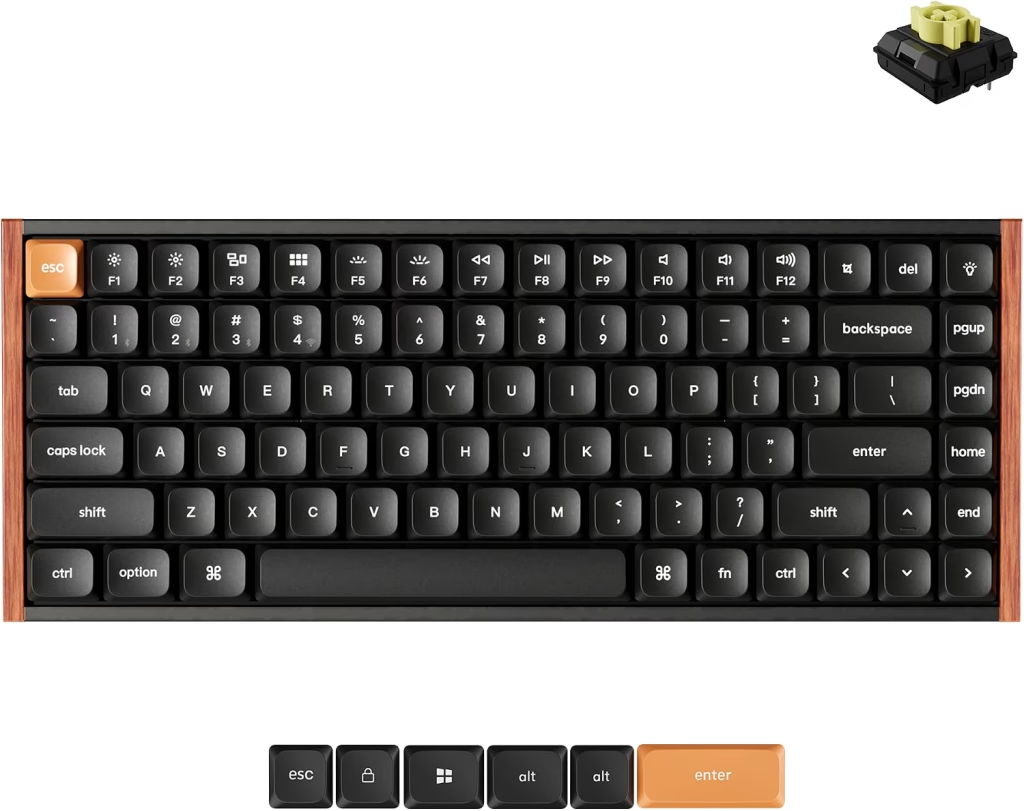
Price: ~$105 | Layout: 75%, ultra-slim | Size: 12.54 x 4.96 x 0.78 in (listed) | Remapping: QMK, Keychron Launcher | Connection: 2.4 GHz (1,000 Hz), Bluetooth 5.2, wired | Best for: Digital nomads and coworking
The Keychron K3 Max SE is our pick for developers who carry their keyboard. For example, at under an inch tall, it slides into most laptop backpacks.
Even so, it still runs QMK, which is rare for a board this slim. As a result, your shortcuts and layers come with you to every café and coworking desk.
Also, the tri-mode connection helps on the road. When hotel Bluetooth gets crowded, you can switch to the 2.4 GHz dongle or a cable.
Fit and sizing: the board measures 12.54 x 4.96 x 0.78 inches (listed). It ships with a Mac layout and stays fully compatible with Windows.
What’s included: the keyboard, a cable and the 2.4 GHz receiver. Keychron covers it with a 1-year warranty.
What owners say: owners rate it 4.4 from 30 reviews. In particular, they praise the build, the premium Banana switches and a sound that is quieter than most mechanical boards.
However, the review count is still small. So treat the rating as early feedback rather than a final verdict.
How it compares: the Lofree Flow Lite 84 costs about $5 less with a softer feel. By contrast, the K3 Max SE adds QMK remapping.
Who it suits: it is ideal for remote developers who work from a different desk each week.
Who should skip it: on the other hand, anyone who wants a tall, heavy typing feel should choose the Q1 Max.
Pros:
- Under an inch tall
- QMK in a travel board
- Mac and Windows layouts
- Tri-mode connection
Cons:
- Only 30 owner reviews so far
- Low-profile feel is not for everyone
Skip if: your keyboard never leaves your desk. Instead, the Keychron Q1 Max types better at home.
7. HHKB Professional Hybrid Type-S: Best Keyboard for Vim and the Terminal

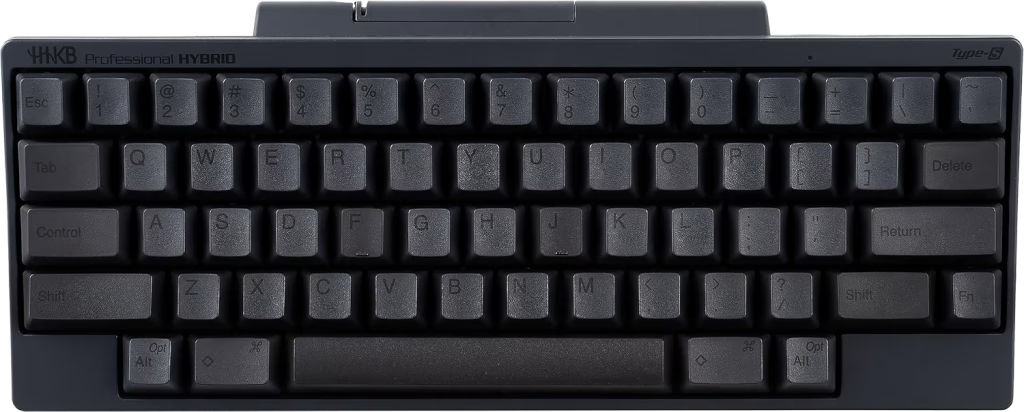
Price: ~$300 | Layout: 60 keys, HHKB layout | Switches: Silent Topre electrostatic capacitive | Remapping: Keymap saved on the board, DIP switches | Connection: Bluetooth (4 devices), USB-C | Best for: Vim, Emacs and terminal-heavy work
The HHKB Professional Hybrid Type-S is a cult favorite among terminal-heavy developers. Notably, its layout puts Control where Caps Lock usually sits.
As a result, vim and Emacs chords become far easier on your pinky. Moreover, the Topre switches are silent and smooth, with a distinct rounded feel.
Better still, your keymap saves on the keyboard itself. Therefore, it travels with you between a laptop, a tablet and a desktop.
Fit and sizing: the 60-key board is compact and listed at 1.2 pounds. However, there are no dedicated arrow keys, so expect a short learning period.
What’s included: the keyboard and a USB-C cable. It runs on 2 AA batteries for Bluetooth.
What owners say: owners rate it 4.5 from 99 reviews. In particular, they call the typing experience phenomenal and praise how quiet it is.
On the other hand, connectivity and value get mixed reviews. At about $300, it is a premium choice.
How it compares: the Keychron Q1 Max costs about $70 less and keeps arrows and a function row. By contrast, the HHKB is lighter, quieter and built around terminal work.
Who it suits: it suits developers who live in vim, Emacs or a tiling window manager.
Who should skip it: on the other hand, anyone who uses a mouse-heavy IDE should choose a 75% board.
Pros:
- Control key where Caps Lock sits
- Silent Topre switches
- Keymap stored on the board
- Light at 1.2 pounds (listed)
Cons:
- No dedicated arrow keys
- Expensive
Skip if: you need the function row for debugging. Then, the Keychron Q1 Max keeps it.
8. Kinesis Freestyle Edge RGB Plus: Best Split Keyboard for Programming Under $250

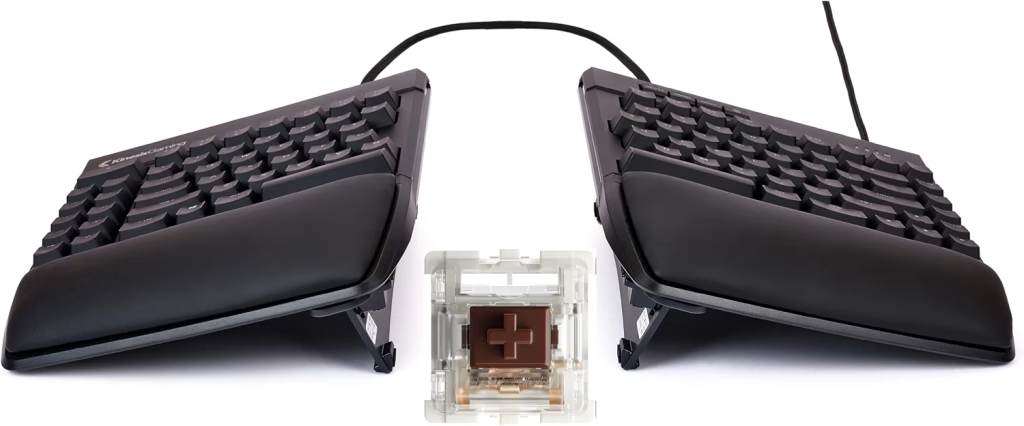
Price: ~$219 | Layout: Split, detachable halves | Switches: Hot-swap tactile | Remapping: On-board | Connection: Wired USB-A | Best for: First-time split keyboard users
The Kinesis Freestyle Edge RGB Plus is the best split keyboard for programming under $250. For example, you can place each half at shoulder width, which keeps your wrists straight.
As a result, the position takes pressure off the shoulders during long sessions. Also, the switches are hot-swap, so you can tune the feel later.
Still, split boards take some adjustment. Usually, most people need a week or two before their speed returns.
Fit and sizing: the halves detach, so you can set any width you like. It is listed at 4.82 pounds and stays wired, so it belongs on a desk.
What’s included: the two halves, a connecting cable and a USB cable.
What owners say: owners rate it 4.2 from 44 reviews. In particular, they say it is well made and that the ergonomics helped wrist and shoulder pain.
However, durability gets mixed feedback, and one owner found key mapping limited. So check that your shortcuts fit before you rely on it.
How it compares: the Kinesis Advantage360 Professional costs about $260 more and adds a contoured shape. By contrast, the Freestyle Edge is a gentler first step into split typing.
Who it suits: it is ideal for developers with early wrist or shoulder discomfort.
Who should skip it: on the other hand, developers who travel should choose a slim 75% board.
Pros:
- Adjustable split width
- Hot-swap switches
- Helps wrist and shoulder posture
- Far cheaper than contoured boards
Cons:
- Wired only
- Learning curve
Skip if: you need Bluetooth. Instead, the Advantage360 Professional is wireless.
9. Kinesis Advantage360 Professional: Best Keyboard for Programmers With Wrist Pain

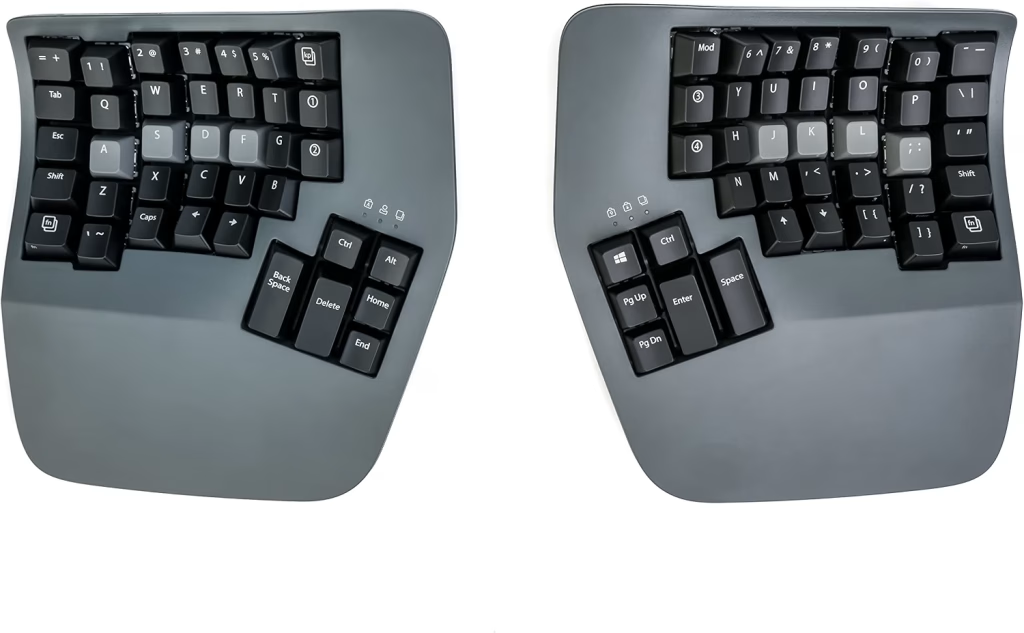
Price: ~$479 | Layout: Contoured split, thumb clusters | Switches: Tactile mechanical | Remapping: ZMK firmware | Connection: Bluetooth, wired | Best for: Developers with RSI or wrist pain
The Kinesis Advantage360 Professional is the keyboard to consider if typing already hurts. For example, its keys sit in curved wells, and your thumbs handle Enter, Space and Backspace.
As a result, the work moves away from your weaker little fingers. Furthermore, the two halves split apart, so your shoulders stay open.
Also, it runs open-source ZMK firmware. As a result, you can remap layers and macros much like a QMK board.
Fit and sizing: the board is large and listed at 3.2 pounds. Expect a learning curve of a few weeks.
What’s included: the two halves, palm supports and cables.
What owners say: owners rate it 4.1 from 206 reviews. In particular, they say it eased hand pain and RSI symptoms, and some type faster once adjusted.
However, Bluetooth pairing draws repeated complaints, and the layout takes time to learn. Some owners also report reliability problems.
How it compares: the Kinesis Freestyle Edge costs about $260 less with a flat split design. By contrast, the Advantage360 adds contoured wells and thumb clusters.
Who it suits: it suits developers who already feel wrist or hand pain.
Who should skip it: on the other hand, budget buyers should start with the Freestyle Edge.
Pros:
- Contoured wells and thumb clusters
- Split for open shoulders
- ZMK remapping
- Owners report less hand pain
Cons:
- About $479
- Bluetooth pairing complaints
Skip if: you just want a nicer keyboard. Instead, the Keychron Q1 Max is far cheaper.
How to Choose a Keyboard for Programming
Which Layout Is Best for Programming?
In general, a 75% layout is the best for most programmers. Put simply, it keeps the arrows and function row while saving desk space.
Here is how the main layouts compare for code:
| Layout | Keys you keep | Good for |
|---|---|---|
| Full-size (100%) | Everything, including a numpad | Data work and spreadsheets |
| TKL (80%) | Function row, arrows, Home and End | IDE users who never touch the numpad |
| 75% | Function row and arrows, in a tighter grid | Most developers |
| 65% | Arrows, but no function row | Developers who use layers for F-keys |
| 60% | No arrows or function row | Vim users and minimalists with layers |
If you rely on F5, F10 and F11 for debugging, keep the function row. Otherwise, a 65% board with a good layer works well.
Which Switches Are Best for Coding?
In general, tactile switches suit most coding, because the small bump confirms each press. Cherry MX Brown and Gateron Brown are common examples.
By contrast, linear switches, such as reds, feel smoother and quieter. Meanwhile, clicky switches sound great but annoy everyone on your calls.
For video calls and shared spaces, choose quiet tactile or silent switches. Similarly, Topre switches, like those on the HHKB, are very quiet.
Why QMK and VIA Matter for Developers
QMK and VIA let you remap any key and save the result on the keyboard. As a result, your layout works on any computer, even a locked-down work laptop.
Here are three remaps developers use most:
- Caps Lock as Escape on tap and Control on hold, for vim
- Also, a layer with brackets and symbols under your home row
- A one-press mute key for Zoom or Google Meet
All four Keychron picks and the RK61 support QMK, and the Advantage360 runs the similar ZMK firmware.
Mac, Windows or Linux?
Most boards here work on all three systems. However, Mac users should check for Command and Option keycaps and a Mac/Windows toggle.
For example, the Logitech MX Mechanical Mini for Mac ships Mac-first. Keychron boards include a switch and spare Mac keycaps on most models.
Is a Split Keyboard Worth It for Programmers?
A split keyboard is worth it if you feel wrist or shoulder strain. Specifically, it lets your hands sit at shoulder width, which keeps your wrists straighter.
First, start with a flat split like the Kinesis Freestyle Edge. If pain continues, a contoured board like the Advantage360 is the next step.
Wired or Wireless for Programming?
Wireless boards are fine for programming, as long as they offer a 2.4 GHz dongle. After all, that connection is steadier than Bluetooth in busy offices and hotels.
Also, keep a cable in your bag. That way, a flat battery never stops your work.
How Much Should You Spend on a Programming Keyboard?
Fortunately, you do not need to spend much to get a good programming keyboard. Here are three price tiers:
- Under $100: the Royal Kludge RK61 or the Lofree Flow Lite 84.
- $100 to $200: try the Keychron V6 Max, the Keychron K3 Max SE or the Logitech MX Mechanical Mini.
- Over $200: consider the Keychron Q1 Max, the HHKB or a Kinesis split board.
For the best mid-range keyboard, the Keychron V6 Max gives you QMK, wireless and hot-swap switches for about $120.
Want to speed up your editor as well? See our guide to essential VS Code shortcuts for Mac.
Best Keyboard for Programming: FAQ
The Keychron Q1 Max is the best keyboard for programming for most developers.
It offers a 75% layout, QMK/VIA remapping and tri-mode wireless for about $230.
Mechanical keyboards are better for programming if you type all day.
They give clearer feedback, last longer and let you swap switches and remap keys.
A 60% keyboard is good for programming if you use layers for the arrows and function row.
Otherwise, a 75% keyboard is easier, because it keeps those keys.
The HHKB Professional Hybrid Type-S is a favorite for vim, because Control sits where Caps Lock usually is.
On any QMK board, you can also map Caps Lock to Escape and Control.
The Royal Kludge RK61 is the best budget keyboard for programming, at about $40.
It is hot-swappable and has over 6,500 Amazon ratings.
A split keyboard is worth it if you feel wrist or shoulder strain.
Start with the Kinesis Freestyle Edge before moving to a contoured board.
Final Verdict: Best Keyboard for Programming 2026
The Keychron Q1 Max is the best keyboard for programming for most developers. Above all, it keeps the keys that code needs and saves your remaps on the board.
On a budget, the Royal Kludge RK61 does the basics for about $40. Meanwhile, Mac users on frequent calls should choose the Logitech MX Mechanical Mini for Mac.
Pair your keyboard with the right screen too. See our guide to the best monitor for developers.
Also Read:


